
Compare plans
Each paid plan includes everything in the plan before it. Safety and privacy features are on every plan.
| Feature | BasecampFree | Summit$99 / year | Peak$179 / year |
|---|---|---|---|
| Locations & Trails | |||
| Scout-approved location database | Included | Included | Included |
| Interactive map view | Included | Included | Included |
| Community location submissions | Included | Included | Included |
| Basic tagging & unit notes | Included | Included | Included |
| Site appraisal system | Included | Included | Included |
| Hiking trail database with waypointsHow the trail library works | Included | Included | Included |
| Security & TrustHow MySummitKeep handles privacy | |||
| Encryption in transit & at rest (AES-256) | Included | Included | Included |
| Microsoft Entra sign-in (OID-based) | Included | Included | Included |
| Database-enforced tenant isolation | Included | Included | Included |
| Field-level encryption of sensitive data | Included | Included | Included |
| Tamper-evident signed audit trail | Included | Included | Included |
| COPPA under-13 consent enforcementHow parental consent works | Included | Included | Included |
| Recycle bin — undo a deletion | Included | Included | Included |
| Self-service privacy rights requestsHow to file a privacy request | Included | Included | Included |
| Parent-controlled public-site consent | Included | Included | Included |
| Report a photo for reviewHow content moderation works | Included | Included | Included |
| Recipe LibraryHow recipes and meal planning work | |||
| Browse 100+ seeded camp recipes | Included | Included | Included |
| Search by meal type & dietary needs | Included | Included | Included |
| View nutrition info & cooking instructions | Included | Included | Included |
| Create custom recipesHow custom recipes work | Not included | Included | Included |
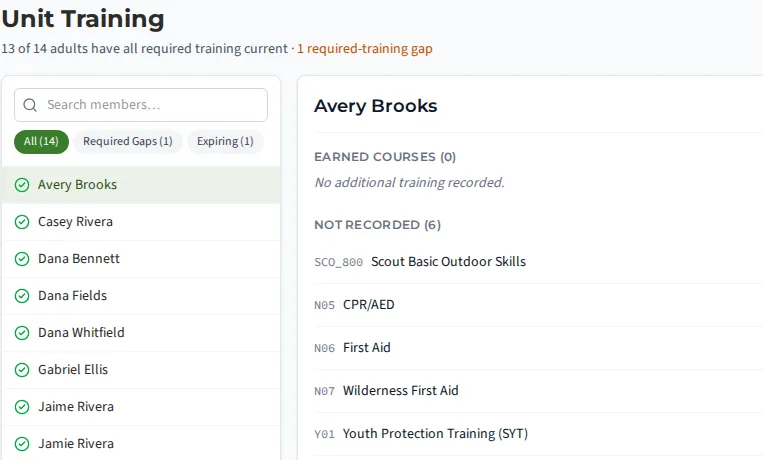
| BSA Training CatalogHow unit training records work | |||
| Browse 600+ course catalog | Included | Included | Included |
| Position-based requirement lookup | Included | Included | Included |
| Unit member training trackingHow unit training tracking works | Included | Included | Included |
| Expiration alerts & compliance dashboard | Included | Included | Included |
| Training gap analysis | Not included | Included | Included |
| Council Event CalendarHow council events work | |||
| Browse council/district eventsHow council events work | Included | Included | Included |
| Export events to personal calendar (.ics) | Included | Included | Included |
| Google & Outlook calendar sync | Coming | Coming | Coming |
| Personal iCal calendar feedHow the unit calendar works | Included | Included | Included |
| Council event registration tracking | Included | Included | Included |
| Auto-sync from ScoutCal.com | Not included | Included | Included |
| See other calendars in the app (iCal overlay) | Included | Included | Included |
| Advancement (Multi-Program)How the advancement workflow works | |||
| Scouts BSA, Cub Scouts, Venturing, Sea Scouts | Included | Included | Included |
| Rank & requirement trackingHow rank tracking works | Included | Included | Included |
| Complete merit badge catalogHow the merit badge workflow works | Included | Included | Included |
| Service hours logging & verificationHow service hours work | Included | Included | Included |
| Board of review scheduling & recordingHow boards of review work | Included | Included | Included |
| Position of responsibility trackingHow positions of responsibility work | Included | Included | Included |
| Order of the Arrow trackingHow Order of the Arrow tracking works | Included | Included | Included |
| Quick entry / bulk advancement updates | Included | Included | Included |
| IA2 export for BSAHow advancement exports work | Not included | Included | Included |
| Advancement progress reportsHow advancement reports work | Included | Included | Included |
| Blue cards as official-form PDFs | Not included | Included | Included |
| Court of Honor blue-card packet | Not included | Included | Included |
| Events & ActivitiesHow event planning works | |||
| Event creation with templates | Included | Included | Included |
| Event registration with capacity limits | Included | Included | Included |
| Event visitors | Included | Included | Included |
| Attendance trackingHow attendance tracking works | Included | Included | Included |
| Event photo gallery | Not included | Included | Included |
| Event reminders (configurable) | Included | Included | Included |
| Summer camp MB selection & registrationHow summer camp registration works | Not included | Included | Included |
| Annual planning wizardHow annual planning works | Not included | Included | Included |
| Event budget planning & expense trackingHow event budgets work | Not included | Included | Included |
| Event roster with patrol assignments and role gapsHow event rosters work | Included | Included | Included |
| Pre-event task assignments | Included | Included | Included |
| Offline camp mode | Not included | Included | Included |
| Trip Pack paper backup (PDF) | Not included | Included | Included |
| Role templates per event type | Not included | Included | Included |
| Drag-and-drop schedule for multi-day events | Included | Included | Included |
| Meeting agenda planner with print viewHow the meeting planner works | Included | Included | Included |
| Per-event packing list checked against each Scout's locker | Not included | Included | Included |
| High-Adventure (Treks & Voyages)How high-adventure events work | |||
| Trek planning & logbook | Not included | Included | Included |
| Voyage planning & logbook | Not included | Included | Included |
| Crew packets & reservations | Not included | Included | Included |
| Activity logs & crew proposals | Not included | Included | Included |
| Parent progress share link | Not included | Included | Included |
| Trek weather outlook | Not included | Included | Included |
| Trek trip builder & route optimization | Not included | Included | Included |
| Trek Leg Log | Not included | Included | Included |
| Communication & DirectoryHow unit communications work | |||
| Safeguarding Youth compliant communications | Included | Included | Included |
| Member directory with search & filterHow the member directory works | Included | Included | Included |
| In-app messagingHow channels and messaging work | Included | Included | Included |
| Bulk announcements (unit-wide) | Included | Included | Included |
| Push notifications | Included | Included | Included |
| Message read receipts | Not included | Included | Included |
| Channel chat (event-linked)How channel chat works | Not included | Included | Included |
| Bulk communications to filtered groups | Included | Included | Included |
| Message reporting with a leader queueHow message moderation works | Included | Included | Included |
| Send unit email from your own Microsoft 365How Microsoft 365 email works | Not included | Included | Included |
| Unit surveys with results and response rateHow unit surveys work | Not included | Included | Included |
| Unit keyword rules that auto-flag messages | Included | Included | Included |
| Parent communication feedHow parents see leader messages | Included | Included | Included |
| Per-channel communication preferences | Included | Included | Included |
| Text messages (SMS) to adults | Not included | Included | Included |
| Saved contact groups | Not included | Included | Included |
| Members & FamiliesHow the member directory works | |||
| Member profiles with history | Included | Included | Included |
| Household/family linkageHow household linking works | Included | Included | Included |
| Parent scout-matching & family builder | Included | Included | Included |
| Multi-household support (shared custody) | Included | Included | Included |
| COPPA parental consent workflowHow parental consent works | Included | Included | Included |
| Emergency contact management | Included | Included | Included |
| Parent portal for progress visibilityHow parents view Scout progress | Included | Included | Included |
| Bulk member invitations (CSV)How bulk invitations work | Included | Included | Included |
| RBAC with granular permissions | Included | Included | Included |
| Sibling tracking across units | Not included | Not included | Included |
| Patrols, dens & divisionsHow patrols, dens and divisions work | Included | Included | Included |
| Join requests with leader approval | Included | Included | Included |
| Account verification queue | Included | Included | Included |
| Bulk roster operationsHow bulk roster operations work | Included | Included | Included |
| Unit leadership chart with open positions | Included | Included | Included |
| Cross-unit member transferHow member transfers work | Not included | Included | Included |
| Import & ExportHow member import works | |||
| Import from Scoutbook, TroopMaster, TroopTrack, TroopWebHost, CSVHow member import works | Included | Included | Included |
| Website content import (TroopWebHost) | Not included | Included | Included |
| 6-step import wizard | Included | Included | Included |
| IA2 advancement exportHow advancement exports work | Not included | Included | Included |
| General data export (CSV, PDF, Excel)How data export works | Not included | Included | Included |
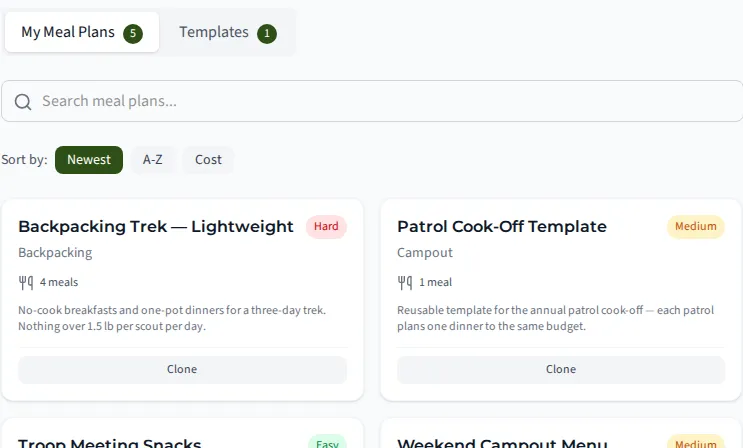
| Meal PlanningHow meal planning works | |||
| Recipe creation & editing | Not included | Included | Included |
| Meal plan creation by day/meal | Not included | Included | Included |
| Assign meal plans to events & patrols | Not included | Included | Included |
| Auto-generated shopping listsHow shopping lists work | Not included | Included | Included |
| Allergen & dietary tracking | Not included | Included | Included |
| Barcode scanning for recipe ingredients | Not included | Included | Included |
| Patrol-based meal coordination | Not included | Included | Included |
| Food storage inspection & sign-off | Not included | Included | Included |
| Equipment & InventoryHow equipment tracking works | |||
| Equipment catalog with CRUDHow the equipment catalog works | Not included | Included | Included |
| Checkout/check-in workflow | Not included | Included | Included |
| Reservation system | Not included | Included | Included |
| Barcode scanning for equipment | Not included | Included | Included |
| Patrol box inventory & expiration alertsHow patrol box inventory works | Not included | Included | Included |
| Storage location management | Not included | Included | Included |
| Recommended gear listsHow gear lists work | Not included | Included | Included |
| My Locker — personal gear inventory | Not included | Included | Included |
| Health & SafetyHow health form tracking works | |||
| Health form compliance tracking (on file Y/N)How health form tracking works | Included | Included | Included |
| Form expiration alerts & renewal reminders | Included | Included | Included |
| Pre-trip health form checklist | Included | Included | Included |
| Dietary preference management | Included | Included | Included |
| Incident report filing & tracking | Included | Included | Included |
| SYT verification status | Included | Included | Included |
| Crew training readiness by trip type | Included | Included | Included |
| Photos & Media | |||
| Photo gallery with album organization | Not included | Included | Included |
| Event photo uploads | Not included | Included | Included |
| Member photo tagging | Not included | Included | Included |
| Geolocation photo map view | Not included | Included | Included |
| Included photo and video storage | Not included | Included | Included |
| Add-on storage packs | Included | Included | Included |
| Your photos are kept if you change plans | Included | Included | Included |
| Unit storage usage meter | Included | Included | Included |
| Event video gallery | Not included | Included | Included |
| AI-Powered ToolsHow the AI assistant works | |||
| AI help assistantHow the AI assistant works | Not included | Included | Included |
| Youth-safe AI safeguards | Included | Included | Included |
| AI location enrichment | Not included | Included | Included |
| AI recipe import from URL | Not included | Included | Included |
| AI meal plan suggestions | Not included | Included | Included |
| AI camp-schedule import from a PDF | Not included | Included | Included |
| Document VaultHow the document vault works | |||
| Secure document storageHow the document vault works | Not included | Included | Included |
| Document categories & search | Not included | Included | Included |
| Expiration alerts | Not included | Included | Included |
| Document versioning | Not included | Included | Included |
| Access level controls | Not included | Included | Included |
| Shared unit resource library | Included | Included | Included |
| Document form builder with e-signature | Not included | Included | Included |
| Assign forms to members | Not included | Included | Included |
| Document completion reporting | Not included | Included | Included |
| Authoritative source-link library | Included | Included | Included |
| Trail LibraryHow the trail library works | |||
| GPX file import | Included | Included | Included |
| Interactive trail maps | Included | Included | Included |
| Link trails to events | Included | Included | Included |
| Unit trail notes | Included | Included | Included |
| BSA Historic Trails catalog (314 trails) | Included | Included | Included |
| Unit Branding & ThemesHow unit branding works | |||
| Custom unit logo | Included | Included | Included |
| Color theme selection | Included | Included | Included |
| Unit display name | Included | Included | Included |
| Public site branding | Not included | Included | Included |
| Unit history and Our History page | Not included | Included | Included |
| Den Activities (Cub Scouts) | |||
| Activity library by den level | Included | Included | Included |
| Den Chief assignments (cross-unit) | Included | Included | Included |
| Den meeting planner | Included | Included | Included |
| Adventure requirement linking | Included | Included | Included |
| Materials list generation | Included | Included | Included |
| Tools & Utilities | |||
| General-purpose checklistsHow checklists work | Not included | Included | Included |
| Meeting notes/minutes | Not included | Included | Included |
| Recharter management workflowHow recharter works | Not included | Included | Included |
| GtSS compliance center | Not included | Included | Included |
| Eagle Scout Project TrackerHow Eagle project tracking works | Included | Included | Included |
| Activity PlansHow activity plans work | Not included | Included | Included |
| Permission slip workflowsHow permission slips work | Not included | Included | Included |
| Scoutbook Plus (IA2) export | Not included | Included | Included |
| Unit self-sufficiency self-assessment | Included | Included | Included |
| Confidential Scoutmaster notes | Included | Included | Included |
| Unit elections & polls | Not included | Included | Included |
| Leadership Council workspace (PLC / Officers) | Not included | Included | Included |
| Unit Success Plan with six lifecycle stages | Included | Included | Included |
| Standing permission slip (sign once for the year)How permission slips work | Not included | Included | Included |
| Compliance alert settings | Included | Included | Included |
| Personal quick list | Not included | Included | Included |
| "I want to…" guided action search | Included | Included | Included |
| Guided unit setup checklist | Included | Included | Included |
| Financial ManagementHow unit finances and payments work | |||
| Scout account balancesHow Scout accounts work | Not included | Included | Included |
| Stripe payment processing | Not included | Not included | Included |
| Venmo & PayPal payments | Coming | Coming | Coming |
| Invoice generation & tracking | Not included | Not included | Included |
| Fundraiser management | Coming | Coming | Coming |
| Financial dashboard & reportsHow the financial dashboard works | Not included | Not included | Included |
| Financial audit log | Not included | Not included | Included |
| Fee exemption handling | Coming | Coming | Coming |
| Online donations by public link | Not included | Not included | Included |
| Unit dues configuration and statusHow unit dues work | Not included | Not included | Included |
| Zeffy zero-fee payment rail | Not included | Not included | Included |
| Advanced Analytics & ReportingHow reports work | |||
| Advancement analytics dashboard | Not included | Not included | Included |
| Patrol comparison charts | Not included | Not included | Included |
| Unit health report | Not included | Not included | Included |
| Custom report generationHow custom reports work | Not included | Not included | Included |
| Scheduled report delivery | Not included | Not included | Included |
| Report export (CSV, PDF) | Not included | Not included | Included |
| Email delivery analytics | Not included | Not included | Included |
| Premium Features | |||
| Priority support (24-hour SLA) | Not included | Not included | Included |
| Public unit websiteHow the public site builder works | Not included | Included | Included |
| Blog & news publishing | Not included | Included | Included |
| Custom branding on parent portalHow custom branding works | Not included | Included | Included |
| API access for custom integrationsHow API access works | Not included | Not included | Included |
| Multi-unit management (requires a council license — sold separately) | Coming | Coming | Coming |
| Commissioner & District tools (requires a council license — sold separately)How commissioner tools work | Coming | Coming | Coming |
| Built-in knowledge baseHow the knowledge base works | Included | Included | Included |
| In-app support requests | Included | Included | Included |
| Coming next | |||
| Merit badge counselor sign-off by emailed linkHow counselor sign-off by email works | Not included | Included | Included |
| RSVP from the email, no sign-inHow RSVP by email link works | Included | Included | Included |
| Eagle packetHow the Eagle packet works | Not included | Included | Included |
| Court of Honor wizardHow the Court of Honor wizard works | Not included | Included | Included |
| Carpools and volunteer shiftsHow event carpools and volunteer shifts work | Included | Included | Included |
| Expense reimbursementsHow expense reimbursements work | Not included | Not included | Included |
| Duty roster for an eventHow the duty roster works | Not included | Included | Included |
| Switch off modules your unit does not useHow menu sections work | Included | Included | Included |
| Unit email lists by role | Not included | Included | Included |
| One-tap family RSVP | Included | Included | Included |
| Events across all my unitsHow events across your units work | Included | Included | Included |
| Treasurer handoverHow the treasurer handover works | Not included | Not included | Included |
| Personal family statement emailHow family statement emails work | Not included | Not included | Included |
| Offline requirement sign-offHow Camp Mode works offline | Not included | Included | Included |
| AI event planning | Not included | Included | Included |
Storage: Basecamp 1 GB, Summit 25 GB, Peak 100 GB. Urgent text messages to adults: Summit 100 and Peak 300 a year, with packs of 500 more for $10. Council and district tools need a council license, sold separately.
Scouting America Chipmunks (pilot): free for every Scurry
A Scurry is not on a paid plan. It is free, and it gets these tools. Read about Chipmunks.
- Parent messaging by email and in the app
- A weekly meeting that repeats through the eight themes
- A parent role rota with snack, setup and story reader roles
- The sticker book, with helper stickers
- The hand-off to a linked pack when a child is ready to be a Lion
- Youth safety and privacy features, as on every plan
What the plans actually look like
Real screens from the app, not mockups.
Ready to simplify troop management?
Basecamp is free forever. Upgrade the whole unit for one flat yearly price, never per Scout. No credit card required.
Secure & Encrypted
Cloud-Based
Works on Any Device