
SMS Notifications
- Effective:
- June 1, 2026
- Last updated:
- October 21, 2026
Get troop event updates, calendar reminders, and important notices from MySummitKeep delivered to your mobile phone. This page describes how the MySummitKeep SMS notification program works, how to opt in, how to opt out, and the terms that apply.
1. Overview
MySummitKeep operates a transactional SMS notification program that lets registered users receive event updates, calendar reminders, claim-token invites, and urgent troop announcements at the mobile phone number they provide. SMS is delivered through our service providers, Microsoft Azure Communication Services and Twilio Inc., on verified U.S. toll-free numbers registered for this program. Participation is fully optional, requires your express consent, and is free for you to leave at any time.
2. Consent and One-to-One Scope
By opting in, you consent to receive recurring automated text messages from MySummitKeep, related to your unit’s use of the Service. Your consent applies only to messages sent by or on behalf of MySummitKeep. We do not transfer your consent to any other party, share your number for marketing, or use it to send messages on behalf of any other sender. This is consistent with the FCC’s one-to-one consent rules under 47 CFR § 64.1200.
3. How to Opt In
Texting is optional. You do not have to agree to texts to create an account or to use any part of MySummitKeep, and text consent is never bundled with our Terms of Service or Privacy Policy. It is a separate checkbox you choose to check.
MySummitKeep SMS enrollment happens in the app only. There is no way to start MySummitKeep texts by texting a keyword to our number. Texting JOIN, START, or YES to our number when you have nothing waiting to confirm gets this automatic reply: “MySummitKeep: To get texts, sign in at app.mysummitkeep.com and turn on text messages in Settings > Notifications. Reply HELP for help.” Texting any other word gets no reply unless it is HELP (see section 8).
-
Sign in to MySummitKeep at app.mysummitkeep.com.
-
Go to Settings → Notifications and open the Text messages (SMS) section.
-
Check the box next to the consent disclosure shown there, then select Send Confirmation Text. (If you don’t have a mobile number on file yet, add one first — the same screen lets you do that.) The box is never checked for you. The disclosure next to it reads, word for word:
Yes, send me text messages from MySummitKeep at this number about my unit’s events and my account, such as event reminders and cancellations, camp check-in and check-out, and unit announcements. Texts are optional and not required to use MySummitKeep. Msg frequency varies. Msg & data rates may apply. Reply HELP for help, STOP to cancel.
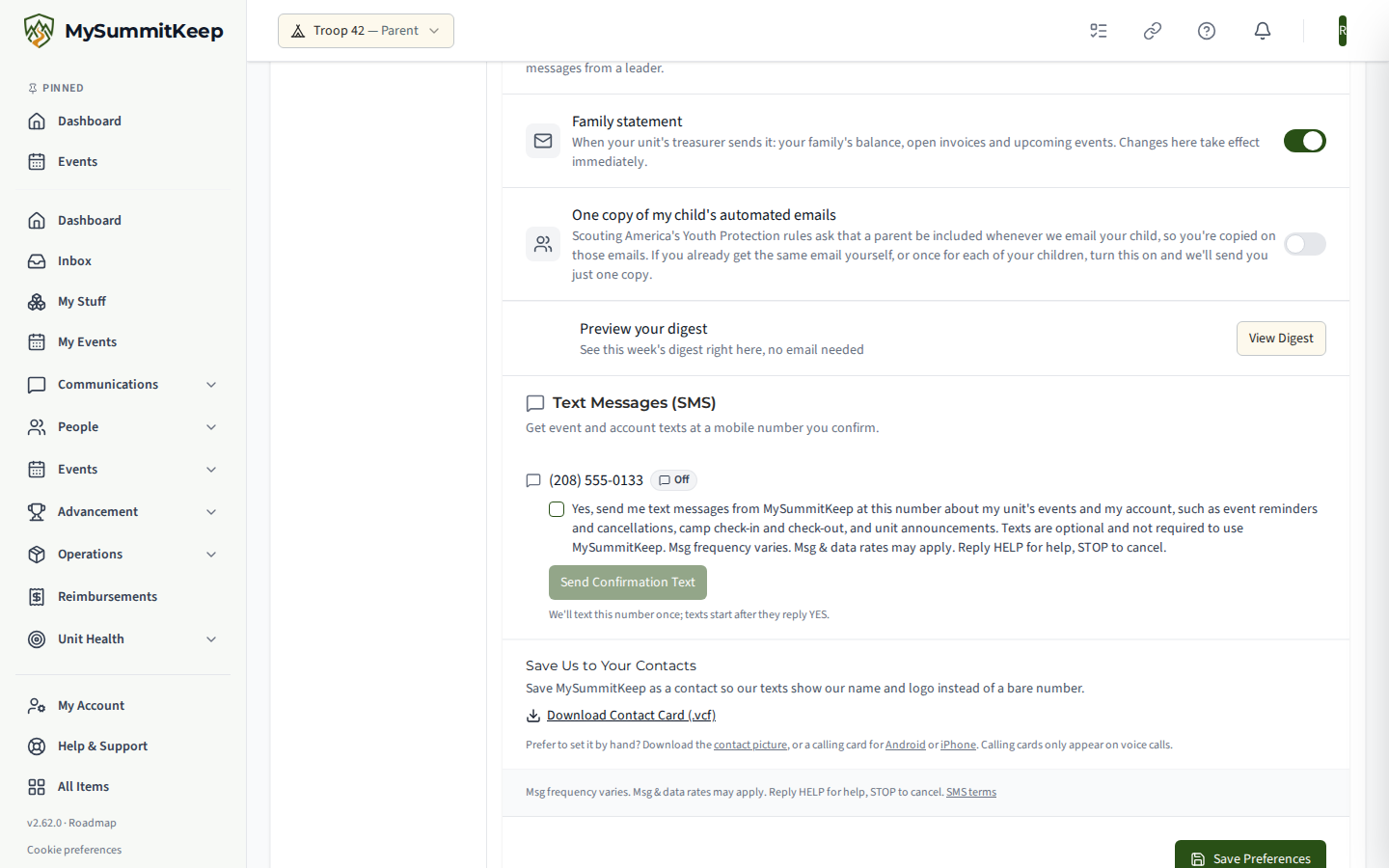
-
We send that phone one text: “MySummitKeep: Reply YES to get event & account texts at this number. Msg frequency varies. Msg&data rates may apply. Reply HELP for help, STOP to cancel.” No other message is sent to that number until it replies.
-
Reply YES from that phone. We confirm: “MySummitKeep: You’re subscribed to event & account texts. Msg frequency varies. Msg&data rates may apply. Reply HELP for help, STOP to cancel.” Texts to that number begin only after this reply.
A unit leader or a parent/guardian can add a phone number and request the confirmation text on someone else’s behalf (for example, a Scout’s own phone, or a co-parent’s) — but texts to that number start only once its own owner replies YES. A leader or parent cannot confirm a number for someone else.
Your opt-in is recorded with a timestamp, the originating mobile number, and the consent language displayed, in accordance with the Telephone Consumer Protection Act (“TCPA”) and applicable FCC rules.
4. Message Frequency
Message frequency varies with your unit’s activity and the alerts you choose to receive by text. Frequency may be lower during off-season periods (winter break, summer hiatus) and may rise around major events such as campouts, courts of honor, or fundraisers.
5. Quiet Hours
Event reminders are sent between 8:00 a.m. and 9:00 p.m. Central time. Time-critical notices — event cancellations and camp arrival/departure — are sent when they happen.
6. Number Changes and Opt-Out Enforcement
If a number replies STOP, we never text it again from this program unless that same number replies START or its owner opts in again through the app. You can remove a phone number, or add a new one, at any time from Settings → Notifications. Changing to a new number does not carry an existing opt-in over — a new number requires its own fresh YES before we text it.
7. Message and Data Rates
Message and data rates may apply. Check with your wireless carrier for SMS pricing on your plan. MySummitKeep does not charge a separate fee for SMS notifications — any charges come from your mobile carrier’s standard messaging rates. Carriers are not liable for delayed or undelivered messages.
8. Help
Reply HELP at any time to any SMS we send for assistance. We reply: “MySummitKeep event & account texts. Help: support@mysummitkeep.com or mysummitkeep.com/sms. Msg freq varies. Msg&data rates may apply. Reply STOP to cancel.” You can also contact support@mysummitkeep.com or reach us through the in-app help center.
9. How to Opt Out
You may opt out at any time:
- Reply STOP to any message you receive from us. This stops all texts from the MySummitKeep program to that number — not just the message you replied to. We reply once with: “MySummitKeep: You’re unsubscribed and will get no more texts. Reply START to resubscribe.” No further messages will be sent to that number except in reply to a keyword (HELP, or START to resubscribe).
- Turn off SMS in your account. Sign in to MySummitKeep, go to Settings → Notifications → Text messages (SMS), and turn off text messages for that phone.
- Contact support at support@mysummitkeep.com and request removal.
We honor opt-out requests within twenty-four (24) hours of receipt, and in all events within the period required by the TCPA and FCC rules. Other accepted opt-out keywords include CANCEL, END, QUIT, UNSUBSCRIBE, and STOPALL.
9.1 How to Resume
Reply START to a number that previously replied STOP to resume texts, provided that number already has an opt-in on file through the app — we confirm with “MySummitKeep: You’re subscribed to event & account texts. Msg frequency varies. Msg&data rates may apply. Reply HELP for help, STOP to cancel.” Texting START, JOIN, or YES to a number with nothing to confirm gets the how-to-opt-in reply from section 3 instead; texting any other word gets no reply unless it is HELP (see section 8).
10. Programs Covered
The MySummitKeep SMS program sends only the message types listed below — there is no general “calendar updates” or “routine announcements” catch-all beyond what’s here. On Settings → Notifications, a confirmed subscriber sees an “Alerts sent by text” list and controls every category directly; five turn on automatically the moment their number confirms, and four stay off until you turn them on.
Turned on automatically once your number confirms:
- Event cancellations — a leader cancelled an event you were registered, approved, or waitlisted for (or, for a youth Scout, one their parent/guardian is linked to).
- Event reminders — sent about a day ahead of an event you’re registered for, only between 8:00 a.m. and 9:00 p.m. Central time (see section 5).
- Camp arrival — a Scout you’re linked to checked in at camp.
- Camp departure — a Scout you’re linked to checked out of camp.
- Urgent unit alerts — a leader’s urgent text about a same-day event cancellation or change, a safety or weather alert, or a pickup or arrival change. A leader adds it to a group message; it goes to adults only and never to a Scout (a Scout’s parent or guardian is texted instead), is never used for routine announcements, and is not sent between 9:00 p.m. and 8:00 a.m. in the unit’s time zone (Central time if none is set) except a safety or weather alert; the leader’s message still reaches you by email and in the app. Each one is a single text message. Turn it off any time in Settings → Notifications (“Urgent unit alerts”) or reply STOP.
Off until you turn them on in Settings → Notifications:
- Unit announcements — a leader’s group message to the unit.
- Reservation reminders — a high-adventure or trek reservation payment coming due.
- Permission slips — a permission slip has been dispatched for an upcoming event.
- Board of review scheduled — a Board of Review has been scheduled for a Scout you’re linked to.
Sent outside the alert list above, to an already-confirmed number only:
- Claim-token invites — a secure, one-time link inviting a parent or Scout to create their MySummitKeep account, sent when a leader or another parent invites someone by SMS. Not a subscriber toggle — it goes to whichever of the recipient’s own Mobile numbers already has a confirmed opt-in on file, so it never enrolls a new number on its own.
Which of these alerts a unit can send by text depends on the unit’s MySummitKeep plan. Units on the Summit or Peak plan (and units on a trial) can send all of them, up to the unit’s yearly text allowance (plus any text packs the unit bought); when the allowance and the packs are used up, the people the text does not reach get the same message by email instead. On any other plan, only the event cancellation text is sent; you can still opt in and receive it, and a member who belongs to more than one unit follows each unit’s own plan. Claim-token invites are also sent by text only for units on the Summit or Peak plan (or on a trial).
We do not send marketing or promotional SMS through this program.
11. Privacy and Data Sharing
We collect your mobile phone number only for the purpose of delivering the SMS notifications you have opted in to receive. We do not sell or share your phone number, opt-in data, or consent records with any third party for marketing purposes. Phone numbers shared with our SMS service providers, Microsoft Azure Communication Services and Twilio Inc., are used solely for message delivery.
See our Privacy Policy for full details on how we handle your information, and our Terms of Service for the SMS-specific terms that apply when you opt in.
12. Consent Recordkeeping
We retain opt-in evidence (mobile number, timestamp, consent language displayed, IP address where applicable, and opt-in pathway) for at least four (4) years from the date of opt-in, consistent with the TCPA statute of limitations. Opt-out records are retained for the same period.
13. Contact Us
MySummitKeep LLC
5005 W Laurel St, Ste 100 #3250
Tampa, FL 33607
Phone (voice calls only; please do not text this number): (813) 418-6800
SMS program numbers: +1 (866) 735-4229 and +1 (866) 995-5337. Our texts come from one of these two toll-free numbers. Text HELP for help or STOP to opt out at either; replying STOP to one stops texts from both. These numbers do not take voice calls.
Email: support@mysummitkeep.com
14. Save Us to Your Contacts
Save MySummitKeep as a contact so program texts show our name and logo instead of a bare number. One tap imports a single contact with our logo, the SMS program number labelled texts only, and our office line labelled office, calls only.
- Download the contact card (.vcf)
- Contact picture (720 × 720)
- Calling card for voice calls: Android or iPhone